
FAQ
Frequently asked questions
Find answers to the most common questions about Assetze's IT asset management platform, features, pricing, setup and support. Whether you are just getting started or managing a large fleet, this section covers what you need to know.
Assets
5 questions
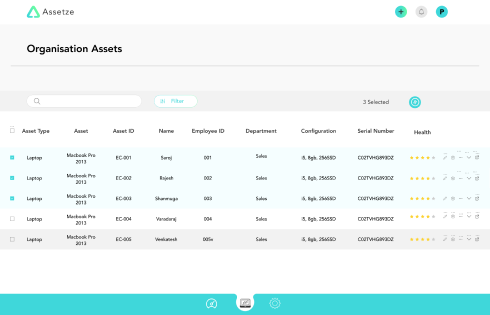
How to add an asset?
- Go to the main dashboard.
- Click the + button at the top, or click "Add new".
- You can manually add every field.
How to move my asset database?
- You can upload your database to the Assetze platform using a CSV file.
- Download the template provided on the website and segregate your data according to the columns provided.
- Upload your database and your data will be visible on the dashboard.
How to add custom inputs?
- In the add asset option you will find various preset fields.
- Scroll down to find the "Custom Field" button.
- A dialog appears where you can provide a custom field name and set its input type.
- Add more fields by clicking "Add field", then click save.
How to check assets by date?
- On the main dashboard,
- click the Filter button and select "By Date".
- The data will be sorted by date.
How to update health?
- Click the health option when you are adding an asset.
- Fill in the details in the form.
- Click save and the health will be shown on the dashboard.
Note: Health updation has to be done manually for each asset.
Profile
3 questions
How to change password?
- Click the profile icon on the dashboard.
- In profile settings, enter your old password and then the new password.
- Confirm the new password and click save.
How to change profile picture?
- Click the profile icon on the dashboard.
- In profile settings you will find your profile picture.
- Click the icon and select a new one.
Can I change my organization email?
- Once registered with an organisation email ID it is not possible to change it.
Pricing
2 questions
Which countries can access Assetze?
- We currently operate in 5 countries: India, US, UK, Canada and UAE.
How do I take the enterprise plan?
- Reach out to us at sales@assetze.com and our team will get in touch with you.
Disposal
2 questions
What products do you take as disposable?
- We currently take disposables from India.
- All kinds of IT asset tools.
How do I reach out to dispose?
- Reach us via the Contact Us section, or mail us at sales@assetze.com.
Still stuck
Ask us directly.
If your question is not answered here, tell us what you are trying to do and we will point you at the right place.
Email sales@assetze.com5Countries supported
24/7IT support
